Comparison: Cooperative OS VS. Preemptive OS
Hello!
At a time when preemptive operating systems are greatly used in all kinds of devices, such as smartphones, tablets, computers, and refrigerators, it is enough to go back 35+ years to notice that this reality was only reserved for business computers and supercomputers. At a time when 640 kilobytes of RAM memory was already impressive, it would be expected that multitasking was something impossible to implement on home desktop computers for individuals. Thus, it became necessary to develop a different technology, wanting, on one hand, to maintain the appearance and utility of a multitasking operating system, but, on the other hand, not consuming so many system resources.
What is multitasking?
To begin with, we have to define what multitasking is. Multitasking is the act of having several applications running in the same work session, which can be complementary to each other or not. Multitasking allows processes to open while others are running, without interfering with any of them. As such, a number n of applications can use the same central processing unit (CPU) and primary memory, each having its reserved memory area.
But how can all the applications use the processor at the same time? Is it possible? More or less. Let’s see: all processes share the same CPU, but all must have their uptime. In theory, it cannot be uninterrupted time because all remaining processes would have to wait for one program to finish its execution or for the user to close it. They also cannot run all at the same time. The processor simply would not be capable of handling such a Herculean demand. So, to solve this, the operating system must have a mechanism that allows the division of the microprocessor’s clock among all processes, whether they are applications opened by the user or critical operating system services. This is where the system software uses its scheduler.
In a basic way, the scheduler is an internal component of the OS that decides which process will use the processor at a given moment. It acts in five cases:
- When a process changes from the ready state to the running state
- When a process moves from the running state to the ready state
- When a process changes from the running state to the waiting state
- When a process changes from the waiting state to the ready state
- When a process is closed or terminates
We will return to this.
Furthermore, when switching the active application (focusing on another window, for example), the operating system takes care of interrupting the previous application, saving its current state, loading the new active application, and giving it general control. This sequence of operations is called context switch. It is the operating system that manages, among other things, the allocation of memory, the use of processor cycles, access to input/output devices, etc., of all processes simultaneously.
Naturally, it is worth noting that if a program accessed another program’s reserved memory, there would be system instability. This was the case with Windows versions up to Windows 95, in the case of Microsoft’s operating system. So, as programs became increasingly complex, and needed more system resources, it was necessary to introduce a memory protection mechanism, resulting from the use of Protected Mode. Memory protection is nothing but preventing memory allocation that has not been granted, assumed to be a hexadecimal range.
Let’s imagine two normal processes, one for Word, and another for Firefox. In the case of memory allocation in Protected Mode, Word would have access, for example, to memory between address 0x0000 and 0x6000. The Firefox process would have access to memory between address 0x6001 and 0xF000. If one of these processes needed more memory, the process would have to “ask” the operating system to update its memory boundaries, incrementing them.
In other words, in the case of Word; it needs a quantity n of memory, so the memory range after the update would be from 0x0000 up to 0x6000 + n. If you notice, you can see that 0x6000 + n, regardless of the value of n, overlaps with Firefox’s memory range. To solve this, the memory range associated with the browser process would have to be shifted by n hexadecimal values. Thus, it would go from 0x6001 + n up to 0xF000 + n. Note that this specific case is very simplified; I just want to explain the concept in a very atomic way. There are several memory addressing models, which could be a good topic for a next article.
Protected mode prevents, on one hand, the process from causing memory overflow over other applications and the operating system, as we can see in the previous example, compromising not only the causing program, but the entire system. On the other hand, this mode also calls for preventing malware that has “attached” itself to the program, since the operating system will account for the fact that the memory range it granted to the program does not equal the range required by the program. There are multiple memory protection methods used by operating systems, but that is not the focus of this article.
Differences between Cooperative/Preemptive Multitasking
With this concept as a principle, we can return to the initial question: what are the differences between cooperative/preemptive multitasking?
Cooperative
Firstly, the context switch action is never initiated from one running process to another directly. On the contrary, the system requires a scheduler for this procedure; that is, it is the scheduler, which encompasses the operating system and the remaining processes, that swaps control between the process and itself.
In other words, returning to the cases where our scheduler operates, it is easy to see that in this type of multitasking, the scheduler operates in the first two scenarios: when a given process changes from the running state to the waiting state and when the process terminates.
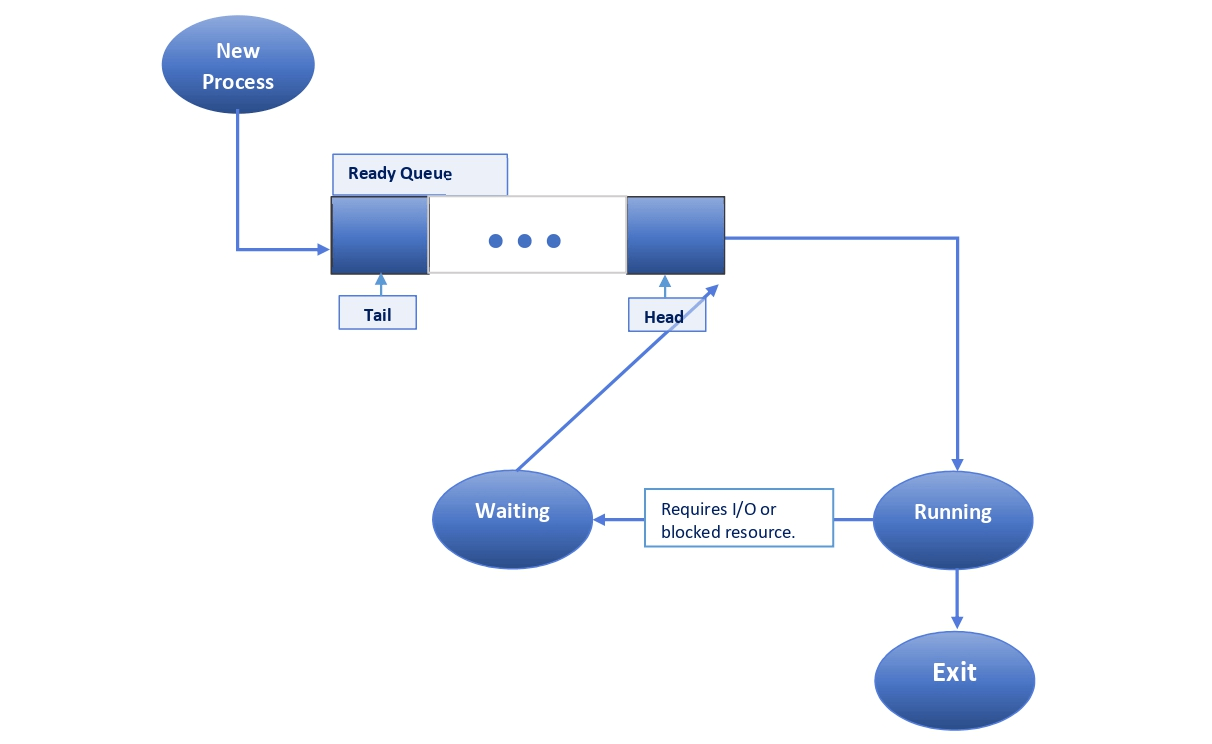
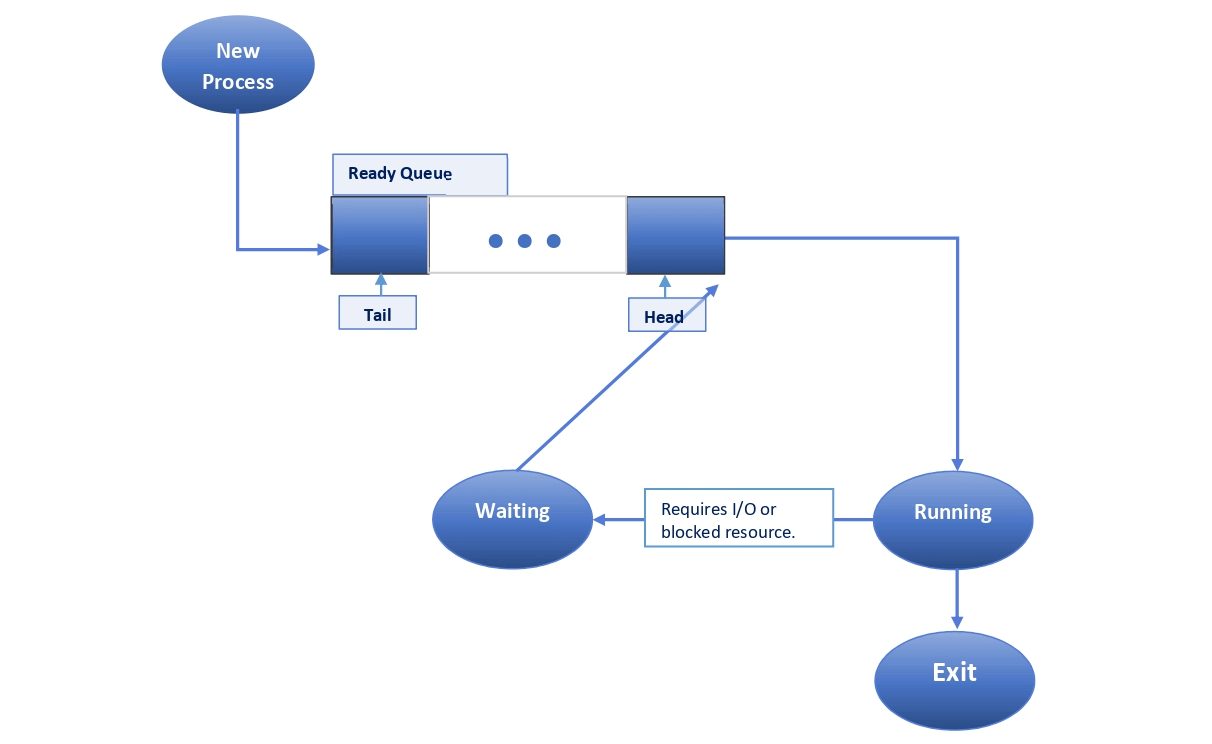
Flowchart of a simple cooperative multitasking model
Source: Baeldung
Let’s imagine that all processes are in a ready queue. In other words, where each process is ready to become active and enter execution, whether it is an application, e.g., a browser, or an internal operating system service. Each of these processes is at a certain position in this queue. So, looking at the flowchart above, we see that when a new process is started, it goes to the end of the queue. Eventually, when it’s its turn to enter execution, it will always be in this state. It can only leave execution in two cases: when the program terminates or is closed by the user, or when there is an I/O request from the program or another request that cannot be immediately satisfied. This process is placed at the beginning of the ready queue when this request is fulfilled, being immediately executed by the scheduler, which was waiting for a new process to run.
It is easy to find a fallacy in this method, however. If the program crashes midway through its execution and cannot return control to the system, it means that the entire system will be prevented from performing other tasks and from guaranteeing control to the user, which will lead to the whole work session being locked until the causing program returns to normal, notwithstanding the fact that the program is poorly optimized.
There are several reasons for the program to stop responding, but the most common ones, especially in this multitasking methodology, are the uncontrolled consumption of system resources, calculations too intensive for the machine in question, or the practice of busy-waiting indefinitely, which means the process cyclically checks if a condition is true, without returning control to the operating system (we can think of this as the processor doing “nothing” and wasting time). Otherwise, the user will have to forcibly restart the computer, which could be a major inconvenience in case of unsaved progress.
But not everything is negative in this interpretation of multitasking; it is very simple to implement applications that run concurrently with each other because there will never be an interruption of control from a scheduler, as in the case of operating systems based on preemptive multitasking. However, the complexity of them is questioned due to the details I pointed out earlier. In other words, as long as the concurrency is from simple and well-optimized applications for the given platform, a cooperative model can be used, since the operating system can allocate resources to the processes more efficiently.
Preemptive
In preemptive multitasking models, the goal is to temporarily interrupt a running task with the intention of resuming it at a later time. There is no assistance, warning, or cooperation from the interrupted process, since, on one hand, it is always a systematic action, meaning it occurs at a specific and constant time interval, and on the other hand, since the operating system always resumes control for itself, in order not to cause system instability, as in cooperative models.
Thus, the context switch action is always performed from one process to another, “avoiding” the need for a traditional scheduler. Even preemptive models use a scheduler, but unlike cooperative models, where they wait for the program to yield control back, these force control back to the system, cooperating or not with the application. We can see that even if a poorly optimized or malicious program runs code that causes an infinite loop, it will only be compromising itself, as the system always retains control, one way or another. From this point of view, it is a notable advantage because it makes the operating system more robust and reliable.
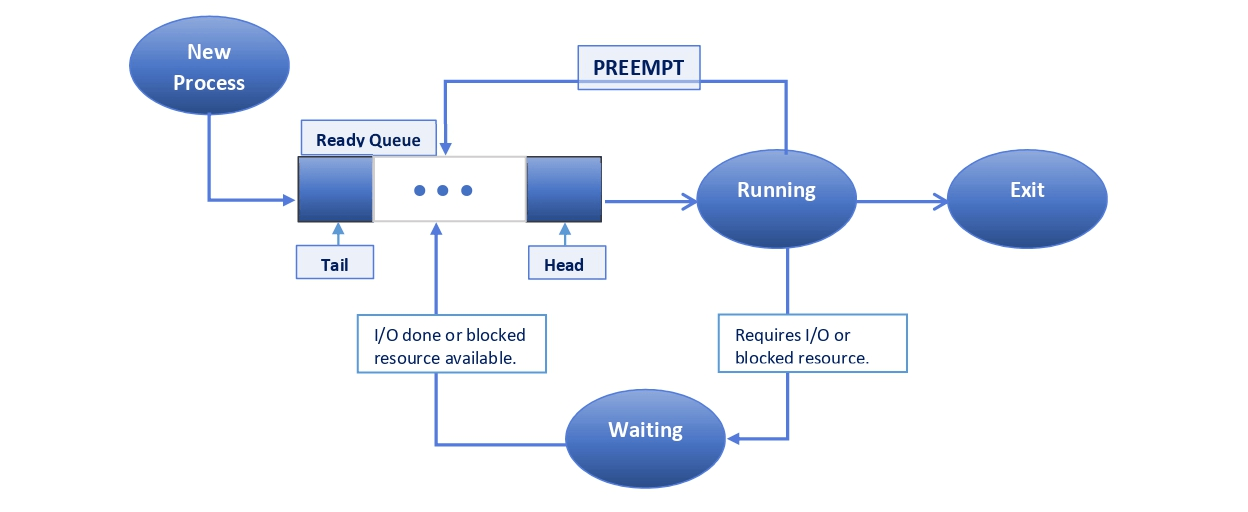
Flowchart of a simple preemptive multitasking model
Source: Baeldung
In this flowchart, we can see the operation of a generic preemptive system. Again, when a new process is created, it goes to the end of the ready queue. From the moment the time comes for the process to be started and running, it can be forcibly placed somewhere in the queue in one of two ways: either it is put into a waiting state, due to an unblocked or I/O reason that is not accessible at the moment, or it is the operating system that puts it in the queue, so as to regain control. However, some more particular cases are raised.
If you don’t know, each process has its priority order. In the case of Windows, we have, simply, 5 major orders: Low, Below normal, Normal, Above normal, and High. Internally, however, it is placed on a numerical scale, ranging from order 0 (low priority) to 31 (real-time - highest priority). Each process has its default priority. Let’s imagine this scenario: we have n number of high-priority processes, and only one low-priority process. If the system has to regain control over any of the processes in order to use a “slice” of CPU time, the highest probability is that this control will be returned to one of these n high-priority processes. This might not be problematic, but this detail must be considered.
The same scenario exists in Linux and other Unix-like systems, but instead of a priority order, it uses a “niceness” classification, from -20 to 20. In other words, the nicer a process is, the less prioritized it becomes. 20 is the nicest, while -20 is the least nice. Curiously, in Linux documentation, they consider 19 as being the least nice, compared with BSD, which considers it to be number 20.
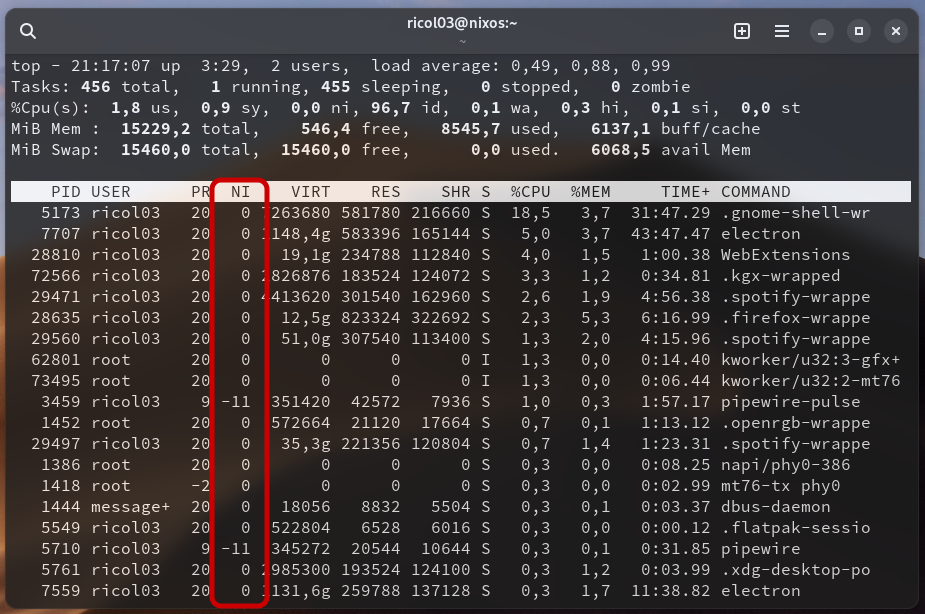
top command on NixOS showing the “niceness” column
Source: Ricol’s Blog
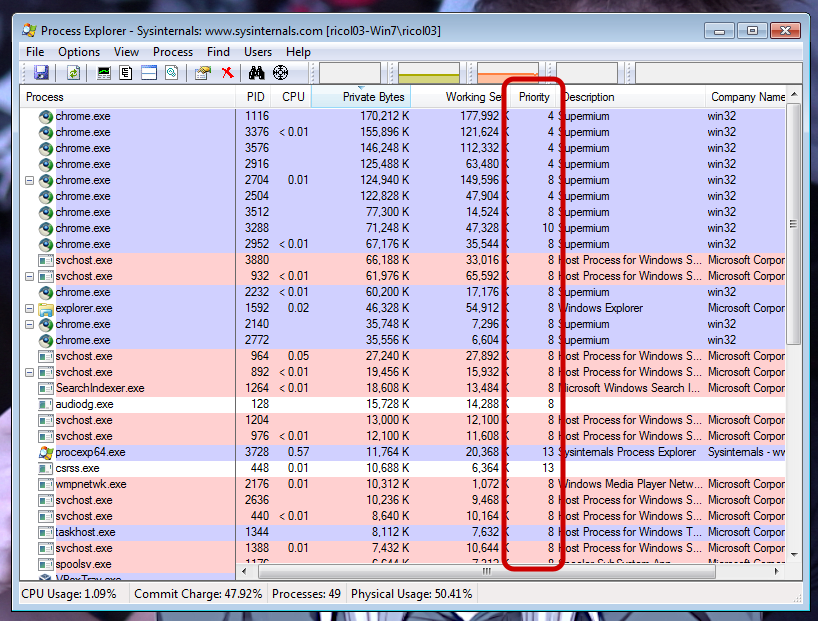
Process Explorer on Windows 7 showing the Priority column
Source: Ricol’s Blog
Concrete examples
We have some basic examples of operating systems with cooperative multitasking, namely:
- Apple System 1 - MacOS 9.2.2
- Microsoft Windows 1.01 - 3.11
- NetWare 1.0 - 6.5
Contrasting with the largest number of operating systems with preemptive multitasking, such as:
- MacOS 10.0 and later versions (although initial versions up to version 10.5 supported cooperative multitasking for running Classic applications)
- Windows NT 3.1 and later versions
- Windows 95 - Me (although supporting cooperative multitasking for running 16-bit applications (Windows 3.1 and earlier))
- Linux (kernel v2.5.4 and later)
If you notice, most operating systems with cooperative multitasking emerged in the early days of personal computing, largely due to the limited system resources that were trendy at the time, in favor of high prices. Therefore, OS developers always had to find a way to make an operating system as accessible as possible, with an intuitive GUI and mouse support, but simplifying the use of system resources, such as RAM and CPU cycles, with less capable multitasking.
In Summary
We have two great philosophies of multitasking: operating systems based on cooperative multitasking and operating systems based on preemptive multitasking. In the first case, its operation always revolves around a central scheduler; that is, it yields control of the system to the program, waiting for the program eventually to yield it back to the scheduler. This control is always given to the currently active application. The greatest advantage is undoubtedly the excellent optimization and management of system resources for software rigorously developed and tested in the given environment. Paradoxically, if an application performs poorly and crashes during execution, it compromises the entire system, rendering it inoperable. This multitasking methodology was common in the 80s and 90s, mainly due to the limited system resources present on desktop computers. Some of the most notable examples are Apple System 1 - MacOS 9.2.2, and from Microsoft Windows versions 1.01 to 3.11.
In the second case, the operating mode is similar to the previous one, but the difference lies in the fact that the scheduler reclaims control after a certain time, whether the application wishes to yield control or not. The greatest advantage is unlimited concurrency of applications without guaranteeing the instability of the entire system. Even if an application crashes during its execution, it will only compromise itself. This form of multitasking was already widely discussed conceptually in the 80s, but would only be implemented in the mid-90s, in the form of Windows NT 3.1 and later versions, and in the Linux kernel, in versions 2.5.4 and later.
Friends, thank you very much for reading until here. I apologize for not having been able to publish any of the articles I mentioned in time; college has been crazy, and I haven’t done anything but study and occasionally relax. In any case, I managed to deliver this article which has been pending for ages. I will try to continue with the plans defined in the previous post, and plan as a bonus to write a less technical article, focusing more on my personal opinion and experience with the topic that I will discuss. I look forward to seeing you in these next articles.
Take care, and see you next time! :)
References
-
Resources and knowledge taught in the Computer Engineering course (bachelor’s) at the Superior School of Technology and Management of Oliveira do Hospital (ESTGOH)
-
https://www.geeksforgeeks.org/process-schedulers-in-operating-system
-
https://learn.microsoft.com/en-us/windows/win32/procthread/scheduling-priorities