The CPU – The Anatomy of a Personal Computer 💻, Part 1
Hello!
You’re no doubt already aware that the processor is the brain of a computer, and it goes without saying that a computer cannot function without it. In this first part of the series, I’ll explain what a CPU is, followed by a brief overview of the various basic concepts relating to this component. This article won’t be an exhaustive analysis of a processor’s inner workings. However, I’ll touch on a few slightly more advanced concepts, though I’ll leave the detailed explanation of those I consider to be truly complex for another time. Without further ado, let’s get started!
What is a processor?
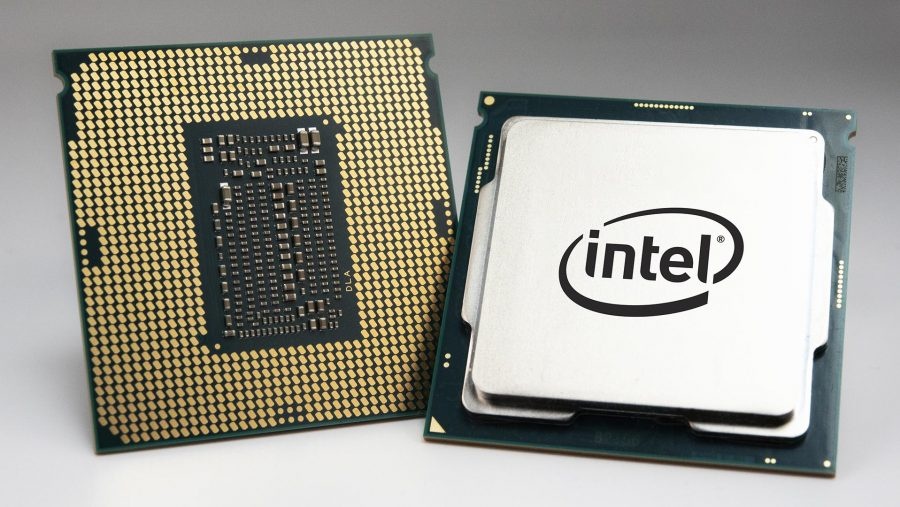
The CPU (Central Processing Unit; also known as a processor) is an integrated circuit (a miniaturised electronic circuit composed of semiconductor devices) containing thousands of basic electronic components, which performs all of a computer’s computational and decision-making functions. All computers and other electronic devices (tablets, smartphones, etc.) rely on it to perform their tasks.
You have probably heard the term ‘microprocessor’ before, and may have concluded that a microprocessor is a CPU. This is a misconception. In reality, the microprocessor is a type of processor (CPU) that contains additional features, such as:
-
Internal cache memory (a high-speed device that acts as an intermediary between an operator [in this case, the CPU] and the storage device accessed by that operator [specifically, RAM]);
-
Memory Management Unit (MMU) (a device that translates virtual addresses into physical addresses and allows the operating system to manage memory allocation for running programmes, as well as providing memory protection and paging);
-
Floating-point unit (FPU) (I will explain this in detail in a future article, as this functionality is a little too complex to be explained briefly)
-
amongst others.
Traditionally, the structure of a CPU consists of two sections: the Instruction Fetch and Decode Section and the Execution Section. The first is where instructions from other components (input devices and memory) are received and then decoded so that the processor can determine which operations are to be executed. The second section is where the received instructions and data are processed; in turn, this consists of two underlying units: the Control Unit (abbreviated to CU) and the Arithmetic and Logic Unit (abbreviated to ALU).
Let us examine these components in detail:
-
Control Unit – controls and/or determines, in a sense, the operations to be performed at any given moment, sending appropriate signals to the other devices and components;
-
Arithmetic and Logic Unit – performs arithmetic operations (addition, subtraction, multiplication, division, exponentiation, rationalisation, …) and logical operations (comparison operations);
Finally, there is one remaining component: the registers. The purpose of these components is to temporarily store data with which the ALU performs the operations instructed to it. They are very small but very fast memories. They are, therefore, composed of SRAM (Static Random Access Memory) (I will explain more about the types of RAM, ROM, etc. in a future part of this series).
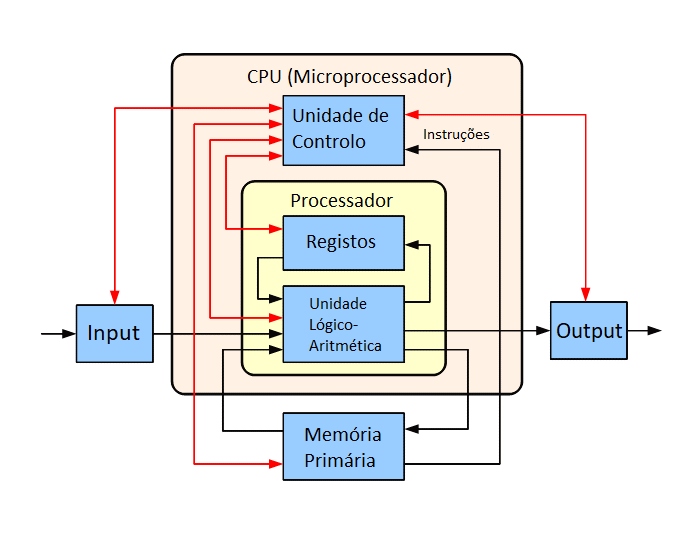
Block diagram of the basic operation of a single-core processor. The black lines indicate data flows, whilst the red lines indicate control flows. The arrows indicate the directions of the flows.
Source: Wikipedia
Basic concepts
Clock rate
The clock rate refers to the frequency at which a processor’s clock generator can generate pulses. These pulses are used to synchronise the operations of its components and are also used as an indicator of the processor’s speed. It is generally measured in GHz (older CPUs use MHz or kHz, depending on their generation).
Transistor
In the case of a microprocessor, a transistor is a binary switch and is the fundamental building block of integrated circuits (ICs). Essentially, a transistor either prevents or allows a certain current to flow. A modern processor can contain billions of transistors.
Integration Scale
The Integration Scale is a classification of integrated circuits based on the number of components (transistors) they contain. This classification is no longer used today.
They are (in ascending order):
- Small Scale Integration (SSI) -> 10 – 100 transistors
- Medium Scale Integration (MSI) -> 100 – 1000 transistors
- Large Scale Integration (LSI) -> 1000 – 10000 transistors
- Very Large Scale Integration (VLSI) -> 10,000 – 100,000 transistors
- Ultra Large Scale Integration (ULSI) -> 100,000 – 1,000,000 transistors
- Super Large Scale Integration (SLSI) -> 1,000,000 – 10,000,000 transistors
Lithography process
Processor lithography is the process of forming the components (transistors, internal memory, etc.) that make up the microprocessor and which affect the potential for increasing chip performance. These are generally measured in nm (nanometres). Older processors use μm (micrometres) as the unit of measurement.
Instructions per second (IPS)
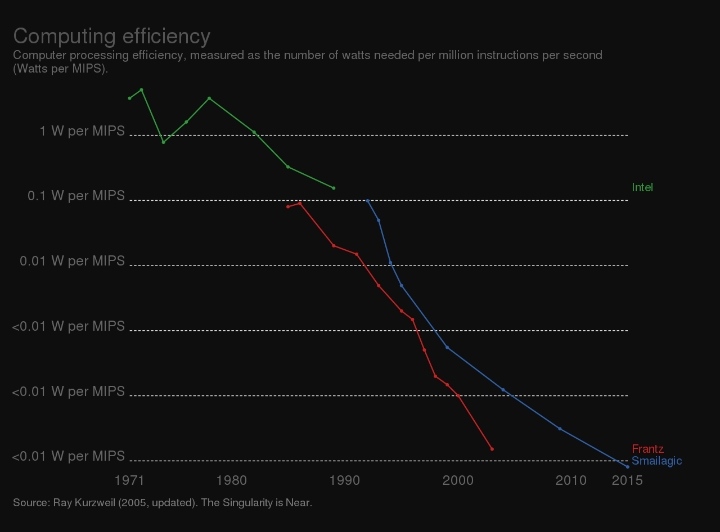
Graph showing computing efficiency, measured in watts required per million instructions per second (MIPS) (Watts/MIPS)
Source: Unknown
Instructions Per Second (IPS) is a metric used to measure the speed of a CPU. This metric is measured in KIPS (kilo IPS), MIPS (million IPS) and GIPS (billion IPS), depending on the generation of the microprocessor.
Core(s)
Known as Core(s) in English, a core is a processor within a CPU. Typically, modern microprocessors have at least 4 cores.
Threads
A thread is a virtual version of a core. A core can be divided into several threads. Usually, they are divided into 2 threads for efficiency reasons. To achieve this, for example, Intel uses its Hyper-Threading technology, whilst AMD uses SMT technology.
Socket
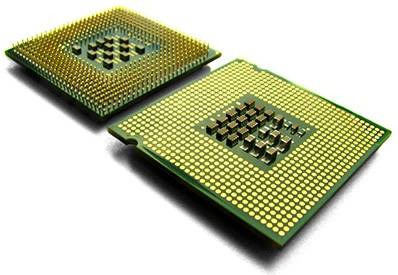
PGA CPU (left) and LGA CPU (right)
Source: Unknown
A socket is essentially a protective housing that surrounds the ICs. Its main function is to ensure a secure connection between the CPU and the socket. Furthermore, the processor may or may not feature pins as a connector. Both options have their pros and cons, which I will not cover in this article.
The socket, in turn, acts as the interface to the processor. The best-known types are PGA (Pin Grid Array) and LGA (Land Grid Array).
I hope you enjoyed the first part of this series. In the next part, I’ll be looking at the primary memory (RAM, ROM, etc.) of a personal computer. Stay tuned!
Take care and see you next time! :)